Why Geometry Dash Feels Harder After Updates?
Many Geometry Dash players feel this, but very few talk about it clearly.
You open the game, play an old level you already completed before, and suddenly it feels harder. Jumps miss. Timings feel off. Everything looks the same, but your muscle memory does not work anymore.
So the question is simple:
Did Geometry Dash actually get harder after updates, or is it just user’s thought?
Tried to explain this properly, in an easy way so you can understand it without any issues.
Did Geometry Dash Really Become Harder?
Short answer: No, the levels did not changed.
But the way of the game reacting to your/players input did.
After these recent updates, especially after the big engine changes or updates many small things started to behave slightly different as it was in previous versions. These new changes are not obvious, but for the timing based games like Geometry Dash even small differences matter a lot.
Additionally, the introduction of new features or mechanics can also contribute to this perception. Players may find themselves struggling to adapt to these changes, leading to frustration. It’s important to remember that while the core levels are unchanged, the experience of playing them can feel different due to these updates.
Another factor to consider is the community’s evolving skill level. As players become more experienced, they may find earlier levels easier, which can create a sense that newer levels or updates are more challenging. This is a natural progression in gaming; as players improve, they seek out greater challenges, which can make the game feel harder overall.
This is why old levels can suddenly feel uncomfortable to play.
Timing Issues: The Real Reason Behind the Problem
The game GD is not just tapping game it is a game to consume time properly for each level.
Even a very small delay can break your rhythm. And if the rhythm is broken then playing this game looks so exhausted and makes users to think about it.
Here are the main reasons timing feels different now:
- Frame rate behaves differently on some devices
- Input response is not always consistent
- Mobile devices struggle more than PC
- Background apps affect touch response
None of this means the game is broken. It just means the system underneath the game changed. So in short the game is not broken even it is now more optimized after new updates.
Why 60 FPS and 120 FPS Feel Different (The FPS Difference)
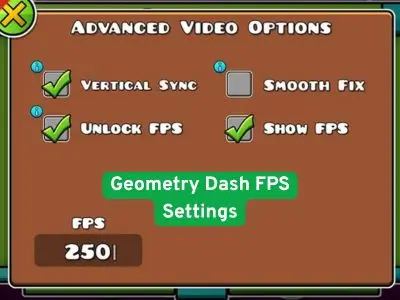
Many players think higher FPS always makes the game easier. That is not always true.
Here’s why:
- At stable FPS, timing feels consistent
- At unstable FPS, timing feels random
- Higher FPS can expose small mistakes
- Mobile devices often drop frames
If your device cannot keep a stable frame rate, jumps may feel delayed or too fast.
This is why the same level can feel fine on one phone and terrible on another. So make sure you device and settings are compatible with the game size. The game is not that big so there should be almost no issues on new phones but if anyone have very a bad software or any hardware issues on their device than it can also make your game feels slow.
If you want to play it faster without any lag issue check your phone’s storage, should have more than required size free space. Like if game size is 158 Mbs, you should almost have 250-350 Mbs free space to play game smoothly. Also if you are playing online then you should have a nice internet connection because slow internet can make feel game laggy.
Mobile vs PC: Why Mobile Players Notice It More
Mobile players complain about this more than PC players, and there is a reason.
Mobile Problems Include:
- Touch input delay
- Background apps running
- Battery saving modes
- Heat throttling
On PC, keyboard input is more stable. On mobile, your tap goes through multiple system layers before reaching the game.
This delay is small, but Geometry Dash is very sensitive to it.
Why Old Levels Feel “Broken” Now
Old levels were created when the game behaved slightly differently.
Creators designed them based on:
- Old physics feeling
- Old FPS behavior
- Old input response
After updates, these assumptions no longer match perfectly.
So when you play those levels today:
- Your muscle memory fails
- Timings feel tighter
- Jumps feel unfair
So it means the level is not broken. Your timing reference is outdated.
APK Users: Why the Problem Feels Worse Sometimes
If you are using an APK version, this effect can feel stronger.
Reasons include:
- Different device optimization
- Android version differences
- Missing background permissions
- Performance limits on low-end phones
This does not mean APK versions are bad. It just means performance varies more across devices.
Stable performance matters more than high performance. There are lot of APK versions so you can check and find which version works better on your device.
What You Can Do to Fix or Reduce This Issue
You cannot fully remove this feeling, but you can reduce it.
Simple Things That Help:
- Close background apps
- Disable battery saver
- Keep graphics settings stable
- Avoid FPS drops instead of chasing high FPS
- Practice levels again instead of relying on old muscle memory
Do not keep changing settings every minute. Consistency helps more than perfection.
Common Questions Players Ask
Is this a bug?
No. It is a side effect of system and engine changes.
Did updates ruin the game?
No. Updates improved many things, but small timing changes are unavoidable.
Is this only on mobile?
No, but mobile players feel it more sometimes.
Is playing older version can be more faster on new devices?
Sometimes depending on the version, but older versions can also create new problems. Use carefully.
Final Thoughts
Geometry Dash did not suddenly become harder.
The game evolved, and your timing habits need to evolve too.
This is normal for rhythm-based games that receive major updates. Once you adjust again, things start feeling normal.
So if a level feels harder now, don’t panic.
- It’s not you being worse.
- It’s just the game behaving slightly differently.
- And once you adapt, the flow comes back.
Note for users:
If you did not understood anything related this article or have any issue with the game, contact us through contact page or comment us the problem which you are getting in this game we will try to respond to your question related to the game.